 Shortszilla
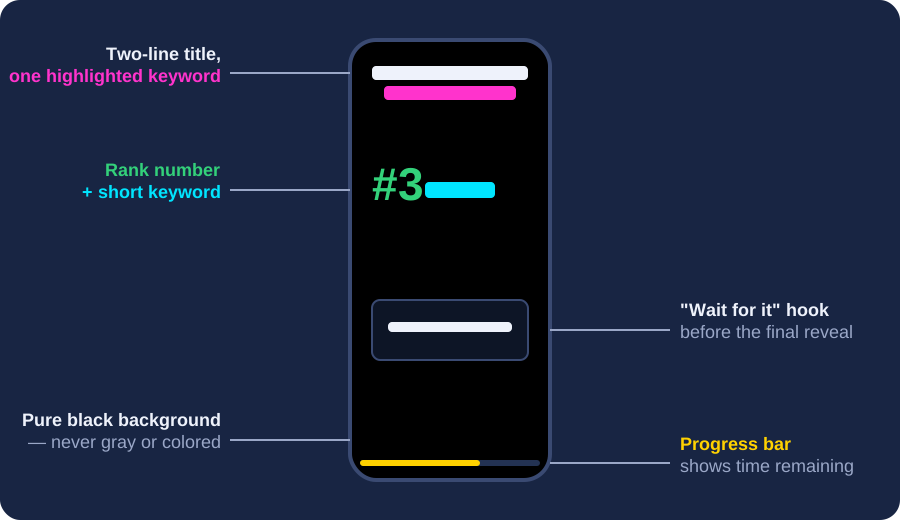
A ranking video is the "Top 5" or "Top 10" countdown format that dominates YouTube Shorts, TikTok, and Instagram Reels: a short vertical video that counts down a list of clips - funniest fails, wildest sports plays, craziest pets - each one stamped with a rank number and a one-word label. Channels built entirely around this format - RankZilla is one well-known example, with over 2 million subscribers - post dozens of these a week using almost the exact same structure every time.
That structure is exactly what makes the format so repeatable: a black background, a two-line title with one highlighted keyword, a countdown from #5 down to #1, a "wait for it" hook before the reveal, and a progress bar so viewers know how much is left. Shortszilla automates every one of those steps - you paste links, and the tool handles downloading, trimming, the rank overlays, and the merge.
How to Make a Ranking Video, Step by Step
Whether you use Shortszilla or edit by hand, every viral ranking video follows the same production sequence:
- Pick a topic with a clear "best of" angle. "Funniest fishing fails" works because it promises a specific, judgeable list. "Fishing videos" doesn't.
- Find 5-10 clips that already went viral elsewhere. A clip that got 2 million views on TikTok is a better bet for your ranking video than an original recording - you're borrowing proven watchability, not gambling on new footage.
- Trim each clip down to its single best moment. Most source clips run 15-20 seconds; the part worth ranking is usually 3-7 seconds of it. Cut the rest.
- Add a rank number and a short keyword to every clip - "#3 PELICAN," not a full sentence. The label should be readable in under a second.
- Order the clips as a countdown (weakest first, best last) so the video builds tension toward the reveal, rather than opening with your strongest clip and fizzling out.
- Merge with a title, a hook, and a progress bar, and export vertical (1080×1920) for Shorts, TikTok, and Reels.
Why Ranking Videos Go Viral
Three mechanics do most of the work. Curiosity gap: naming a rank number before showing the clip ("here's #1") makes the payoff a small mystery, and mysteries get watched to the end. Borrowed virality: compiling clips that already proved themselves on another platform is a much higher-probability bet than filming something new and hoping. Format familiarity: once a viewer has seen a handful of ranking videos, they instantly recognize the pattern - the black background, the countdown, the "wait for it" - which lowers the barrier to watching just one more.
Common Mistakes That Kill Ranking Videos
- Counting down too slowly. If clip #7 gets the same 8 seconds as clip #1, viewers drop off before the good part.
- Vague or missing labels. A rank number with no keyword next to it gives the viewer nothing to anchor on.
- No hook before the reveal. A one-second "wait for it" card before the final clip meaningfully increases watch-through.
- Wrong aspect ratio. Horizontal clips look amateurish on Shorts/TikTok - everything needs to be cropped to vertical.
Build your first ranking video free
Shortszilla handles the download, trim, rank overlays, countdown ordering, and merge - you just paste links and pick a title.
↑ Try the tool aboveFrequently Asked Questions
What length should a ranking video be?
Most successful Shorts/TikTok ranking videos run 45-90 seconds total - roughly 5-8 seconds per clip across 5-10 ranked clips, plus a couple of seconds each for the hook and any outro.
Do I need permission to use clips I didn't film?
Using someone else's clip in a compilation sits in a legal gray area that varies by platform and country. Many ranking-video channels credit the original creator in the caption or a corner watermark; when in doubt, use clips you have rights to or that carry a permissive license.
What's the ideal number of clips to rank?
5 or 10 - both numbers are familiar "round" list sizes that set clear viewer expectations before the video even starts.